1.1.1 Structure and function of the processor

The CPU (central processing unit) is the primary processor within a computer that is responsible for fetching, decoding, and executing instructions in order to process data and execute programs.
The CPU is split into a few different subcomponents.
Control Unit
The control unit (CU) is responsible for managing and directing the whole processor. The CU will decode the instructions using a binary decoder and perform any actions necessary to coordinate other components.
The CU is responsible for:
- Sending control signals to the memory controller for memory read/write operatins
- Decoding instructions
- Managing the ALU and its operations
Tip
If anything requires sending a signal, it’s often the CU responsible
Clock
The clock is an internal timer used by the CPU to coordinate and synchronise the processor’s operations.
The clock involves a continuous oscillaton between 0 (low) and 1 (high) states.
A clock period is the same as a wave period, which is the time between two high states or two low states.
Note
One CPU operation or instruction can take several clocks. For example, memory read/writes are infamous for being slow.
There are also additional CPU instruction sets, such as AVX-512 that involve significantly more complex instructions that require many more clock cycles to complete.
ALU
The ALU is responsible for any arithmetic or logical operations that need to be carried out.
The result from the ALU is automatically moved into the ACC.
The ALU generally performs the following tasks:
- Addition
- Subtraction
- Multiplication
- Division
- Boolean evaluation (AND, OR, XOR, NOT, etc)
Registers
Registers are small sections of the CPU that store data that is currently in use by the CPU. They are often only a few bytes wide (generally 16-128 bits wide), where the current standard is for CPUs to have their general registers at 64 bits.
Registers are the fastest data storage since they are embedded directly onto the CPU’s silicon.
There are both general use registers and dedicated/special use registers. The special use registers are named and have specific functionality within the CPU. General use registers can be used by the programmer (or compiler) to allocate data as desired. Often times, the general purpose registers are used as additional accumulators.
Tip
Many of these registers are self explanatory, so fall back on that in an exam where necessary!
Program counter
The Program Counter (PC) is the register that stores the address of the next instruction to fetch from memory and execute.
For example, if the CPU was about to execute a program and the first instruction of that program was at index 599, that is what would be stored in the Program counter.
Memory Address Register
The Memory Address Register (MAR) is a register that stores an address in memory where data is about to be read from or written to.
For example, if the CPU needed to read from a specific memory address (0x696969), this address would be stored in the MAR and then passed through the address bus.
This register will store the address that is going to be used for the next memory operation, whether it’s a read or write.
Current Instruction Register
The current instruction register is a register that stores the instruction that is currently being executed by the CPU. Pipelined CPUs will often have several CIRs to contain the instructions that are still being processed through the pipeline.
CIRs are necessary because of potential memory read/writes requiring the MAR and MDR to be populated with other things, so the instruction being executed is moved into the CIR to not be overwritten.
Memory data register
The memory data register (MDR) is the register that stores data that is about to be written to memory or data that has just been read from memory.
Tip
It can help to internally refer to this as the Memory Buffer Register (MBR), since that is a better descriptor of what this register actually does. OCR’s mark schemes have stated in the past
Allow Memory Buffer Register for MDR.
This register is often populated with results from the Accumulator, or with data that has been read from the system memory and passed through the Data bus.
This register is necessary since memory read and write operations are incredibly slow relative to the rest of the CPU due to the difference in clock speeds, so storing data here during a memory read/write reduces the chance that the CPU will stall from waiting for the memory controller.
Placing data into the MBR ensures that the memory controller (connected to the data bus) can read/write at its own pace, without forcing the whole CPU to wait for it.
Accumulator
The Accumulator (ACC) is the register that stores the result from the ALU. The two are directly connected, where the output of the ALU is automatically moved into the ACC.
Status register
Caution
Not clear whether this is in the spec.
The status register (SR) is a register that contains different flags regarding the state of the CPU. Generally this will contain information regarding the last operation from the ALU.
Each bit of the status regiter correlates to a different flag. So the first bit of the SR could correlate to whether an arithmetic operation contained a carry, while the second bit could be whether to disable or enable CPU interrupts.
These are often the same size as the word size of the CPU (64, 32, 16 bit, etc.)
Interrupt Register
Important
This register is important within 1.2.1: Systems Software. Refer to that chapter for more information
The Interrupt Register (IR) is a special use register similar to the SR where each bit correlates to a different interrupt.
Different interrupts will have a different bit assigned, which is also used to identify where the interrupt originated from.
At the end of each FDE cycle, the CPU will check the interrupt register for any unmasked interrupts or any interrupts that are higher priority than what is currently being executed and then set the PC’s contents to the address of the associated ISR if necessary.
Buses
The CPU contains different buses which are responsible for communication and the transfer of data between components.
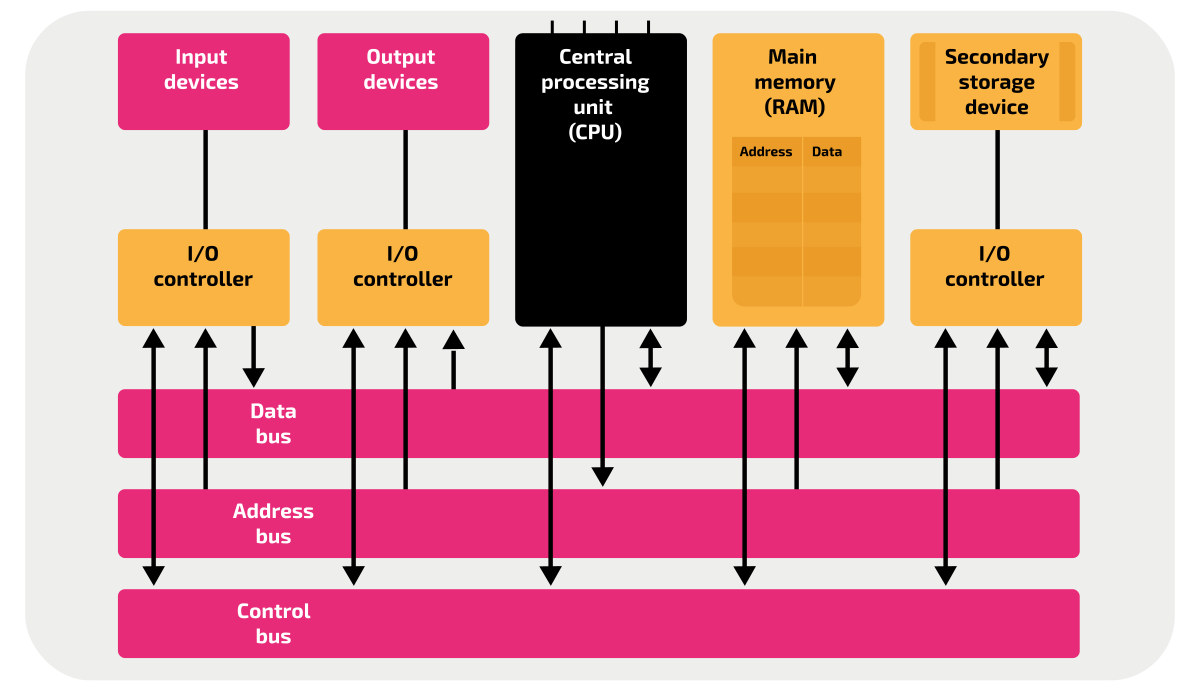
System buses are composed of parallel connections that connect two or more components within the CPU.
External buses are buses that connect the CPU to external components such as peripherals.
The width of a bus determines how many bits can be transferred in one operation, often in multiples of 8 bits.
Address bus
The address bus is a bus that connects the CPU’s MAR to the main memory and I/O controllers. It is unidirectional outwards from the MAR.
The width of the address bus determines how many memory addresses can be accessed. An address bus with a width of n bits, then there can be \( 2^n \) possible addresses. This is also the limiting factor in the total memory capacity of a system.
Data bus
The data bus is a bidirectional bus that connects pretty much everything to the CPU. It can contain data and addresses.
The data bus can allow data from input devices to be passed into the CPU, and also data to be written to output devices from the CPU.
Control bus
The control bus is a unidirectional bus that transmits control signals from the CPU’s control unit to other components inside and outside of the CPU.
The control bus is used for tasks like:
- Memory read
- Memory write
- Bus requests/grants
- Interrupts
- Clock signalling
FDE Cycle
When the processor needs to carry out an instruction, it will perform the FDE Cycle.
The FDE cycle is a set of 3 stages that the CPU repeats in order to execute an instruction.
The FDE cycle assumes that the instructions are already present in RAM as machine code.
Fetch
The FDE cycle begins with fetching the next instruction from RAM.
As stated before the PC contains the address of the nexxt instruction to be executed, so the address in the PC is copied into the MAR before being incremented to the next address for the next cycle.
Important
In the case of a branch, interrupt, or any other circumstance where the next instruction is not at n+1, the PC will be set accordingly
The MAR now contains the address of the next instruction. The CU can now issue a request to the MAR to pass the address down the address bus, and then issue a memory read signal to tell the memory controller to copy the value stored at that address into the MBR, moving it through the data bus.
Now that the MBR contains the next instruction, copied from the main memory, the contents of the MBR are copied into the CIR to be used in future stages.
This is because operations from the instruction being executed may need to utilise the MBR.
Decode
The decode stage involves converting the instructions fetched into the opcode and operand needed to actually determine and execute the new instruction.
The opcode determines what operation to perform, while the operand are the ‘arguments’ to the operation, such as registers, addresses, immediate values, etc.
Note
I think that’s it for this section, I don’t actually know and the spec is vague anyways
Execute
Now that the instruction has been decoded, it can now be executed.
At this point, the CPU’s execution can vary since it will depend on what instruction is currently being executed. The following are some common situations.
| Arithmetic | The numbers are fetched from memory and stored in the general purpose regsters, where the ALU performs the operation on them, storing the result into the ACC. |
| Logic | Two booleans are evaluated by the ALU, often stored in the GPRs or the MBR, or wherever |
| Memory write | The value being written to memory is copied into the MBR, and the address to write to is copied into the MAR. The CU issues a memory write request, where the address is copied through the address bus to the memory controller. The memory controller receives the data to write through the bidirectional data bus, where it can then write the data to the memory address specified. |
Pipelining
Pipelining in the CPU is where the CPU will separate instructions into a variety of different stages in order to parallelise the execution of the instruction.
This in turn can increase efficiency and processing speed. In modern computers, this is possible because of different parts of the control unit being used to perform different things such as the fetching being done separately to the execution.
In cases like the FDE Cycle, the stages are quite distinct, isolated, and repetitive so they can be pipelined. By utilising additional registers to store the intermediate results of the different stages, the different stages can occur at the same time (for sequential instructions).
The following diagram (from wikipedia) is the best descriptor of this.

Caution
Some of the following sections are copied directly from my SLRs. Rewriting them will occur later if ever
CPU Model Architecture
The CPU is often abstracted into two models, the Von Neumann Architecture and the Harvard Architecture. Both of these concepts are useful in modern processors, however a mix of the two is generally used in modern systems.
Von Neumann
The Von Neumann model is the first and simpler model, where the instructions and data are stored in the same space in memory. The memory and data bus is also shared in the VNA, which can potentially lead to bottleneck issues when transferring larger and larger amounts of data.
The Von Neumann bottleneck is a consequence of only having one bus between memory and the CPU. The bus can only read data or memory one at a time, limiting the CPU throughput significantly. VNA also has the consequence of potential for overwriting code by accident, since data and instructions are stored in the same location.
Harvard
The Harvard architecture was designed to improve upon the Von Neumann architecture, where instead of having a unified bus and cache for data and instructions, it would separate to two to allow for concurrent read and writes.
This in turn can increase the overall performance, as the CPU can do 2 slow operations at the same time, instead of doing them in sequence. The division of the instruction and data memory also means that they can be resized accordingly, improving optimization and making it more flexible for the developer if they wanted to have different properties for each type of memory. (RO or RW, etc.)
The Harvard architecture also has the benefits of being able to utilise Out-Of-Order Execution (running independent instructions while waiting for IO bound instructions to complete, preventing pipeline stalling), superscalar execution (multiple instructions in one clock cycle), and other execution optimisations.
-
Credit to Isaac Computer Science, under OGLv3. ↩